Viewing orders
To view the list of orders created by the user within a specified time period, perform the following steps:
1. Go to the «Orders/Reports» section in the left vertical menu of the MixVel Cashier web application.
2. Select the «Orders» section.
3. In the window that opens, select the data upload period.
4. Click the «Generate» button.
If information matching the specified parameters is found, the system displays a table containing the list of orders and their key data.
Within the table body, the following information on the user's orders is available:
-
Row sequential number;
-
Cart — cart identifier; by clicking the identifier, the user can open the order for viewing in a new tab;
-
Order — order identifier; by clicking the identifier, the user can open the order for viewing in a new tab;
-
Created — order creation date;
-
Passengers — list of passenger full names in the order;
-
Service — information on the primary service in the order;
-
Total — total order cost.
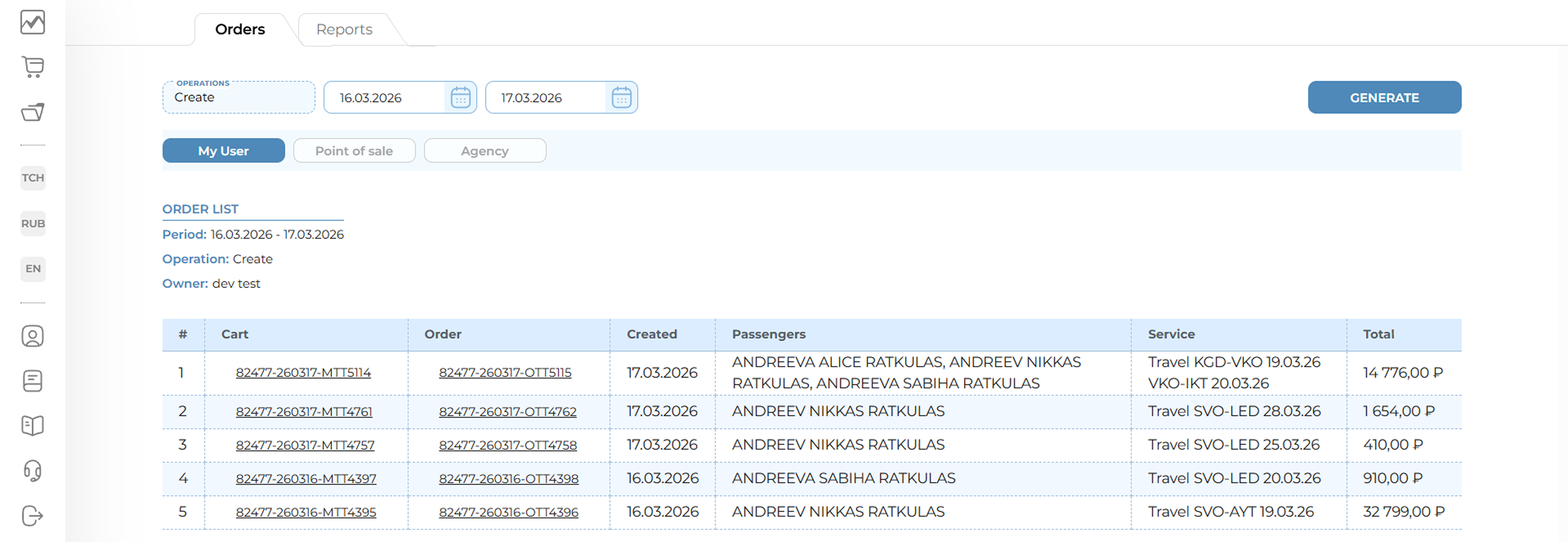
Orders page
Notes:
-
The Orders section allows the user to view all orders created by this user. Maximum report depth is 3 months.
-
Viewing the list of orders by point of sale and by the agency of the user whose credentials were used for login is unavailable in the current version.